Keyword Explorer
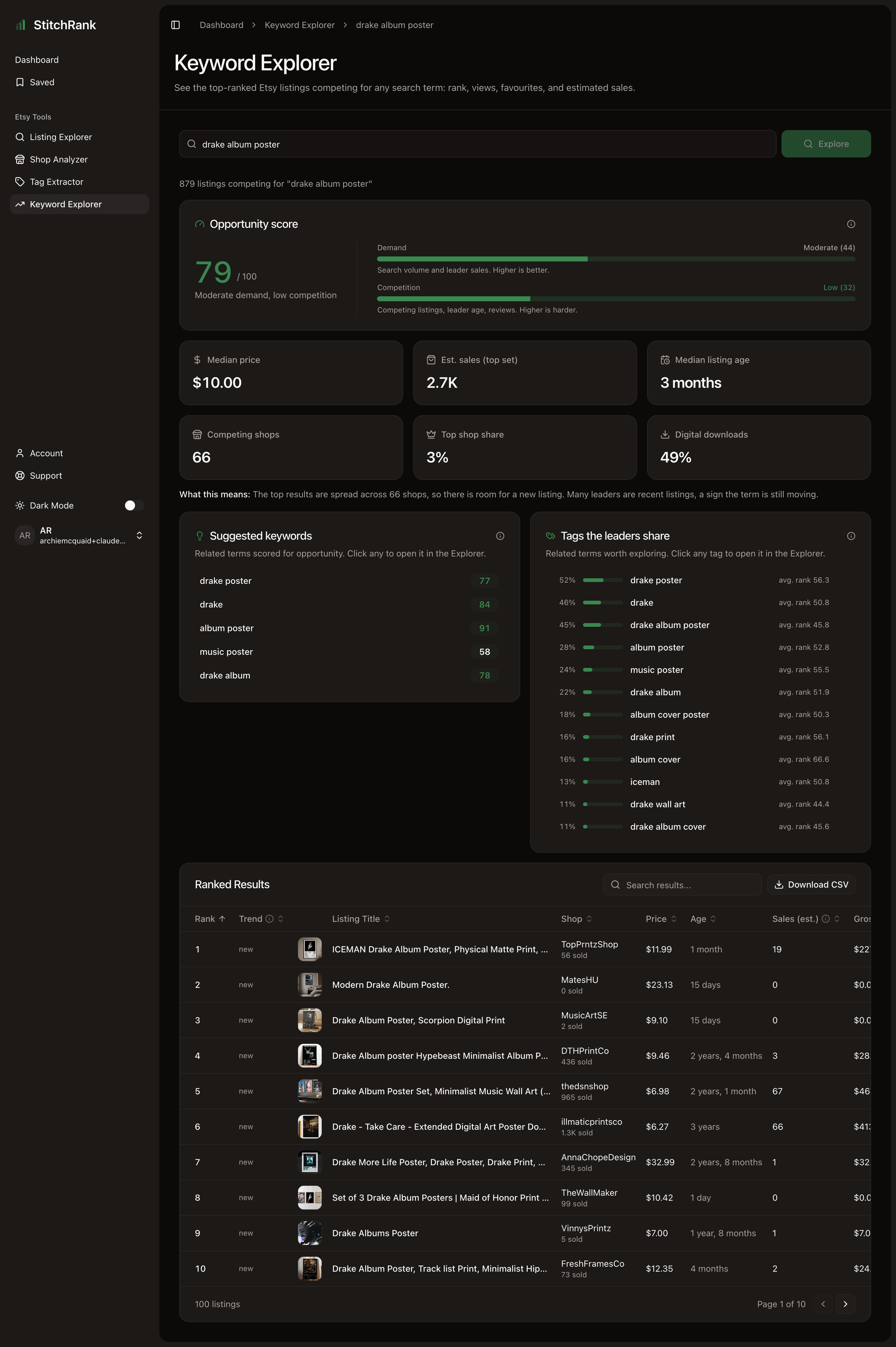
Keyword Explorer answers the question every seller should ask before making a product: is this search term worth competing for? It weighs how much buyers want a term against how hard the existing competition is, so you can spot the gaps instead of walking into a crowded fight.
When to use it
- You are deciding whether to make a new product and want to size the demand first.
- You have an idea but suspect the term is saturated, and you want proof either way.
- You are hunting for mid-tail terms with real demand and beatable competition.
- You want to see exactly which listings you would be up against, and how they rank.
What you get
- Opportunity score (0-100) with a demand and a competition meter behind it.
- Market shape tiles: median price, estimated sales for the top set, median listing age, number of competing shops, the top shop's share, and the percent that are digital.
- Ranked results the listings currently ranking for the term, with price, age, estimated sales and gross, views, favourites, and how each one's rank is trending.
- Shared tags the tags the ranking listings have in common, with how widely each is used.
- Your shop's rank enter your own shop name to see where you place among the top results for the term, plus any rank movement we have recorded. It reads the results already on the page, so it uses none of your quota.
How to read the results
Start with the Opportunity score. It balances demand against competition on a 0-100 scale, and the app labels the bands for you:
- 66 and above high opportunity. Demand outweighs the competition. Worth pursuing.
- 33 to 65 moderate. Viable, but you will need a real angle to stand out.
- Below 33 low. Either thin demand or a market that is already locked up.
The demand and competition meters use the same bands, and they tell you why the score is what it is. A high score driven by strong demand and low competition is the dream. A middling score from high demand and high competition means there is money here, but you are entering a brawl.
Then read the market shape tiles for the texture the score hides:
- Top shop share at or above 30 percent one shop dominates the term. Hard to break in unless you find a sub-angle they are missing.
- Median listing age under about 6 months a fresh, fast-moving market. Newer listings are still winning, which is good news for a new entrant.
- Digital at 50 percent or more the term is mostly downloads. Make sure that fits what you sell.
Finally, scan the ranked results. If the top listings have only modest estimated sales, the term is more beatable than the raw result count suggests.
Turn it into action
- High score, modest leader sales, fresh market go for it. Borrow the shared tags every ranking listing uses, then differentiate on the rest of your tag slots and your photos.
- High demand but dominated or old, high-review market avoid the head-on term. Look at the suggested keywords for a narrower sub-angle you can own.
- Low score drop it, or come back with a more specific variation.
To see where you already stand on the term, open the Where does your shop rank? panel and enter your shop name. It fills in automatically if you have connected your shop under My Shop, so you land on any result already knowing your position. The check reads the results on the page and uses none of your quota. See Check your shop's rank for that workflow.
Once you have picked a term, use the Check your listing against these tags panel under the shared tags to paste your own listing and see exactly which winning tags you are missing, then copy the gap straight into Etsy. See Close the tag gap for that workflow.
To go deeper, open a top result in Listing Explorer to study what is working, and use Tag Extractor to pull a full tag set in bulk. For the full workflow, see Validate a new niche. Curious how the score is built? See Methodology.
Related
- Next: Check your shop's rank to find where you place for a term.
- Next: Close the tag gap to fix your own listing's tags.
- Next: Listing Explorer to study a single ranking result.
- Next: Tag Extractor to pull the winning tags in bulk.