Listing Explorer
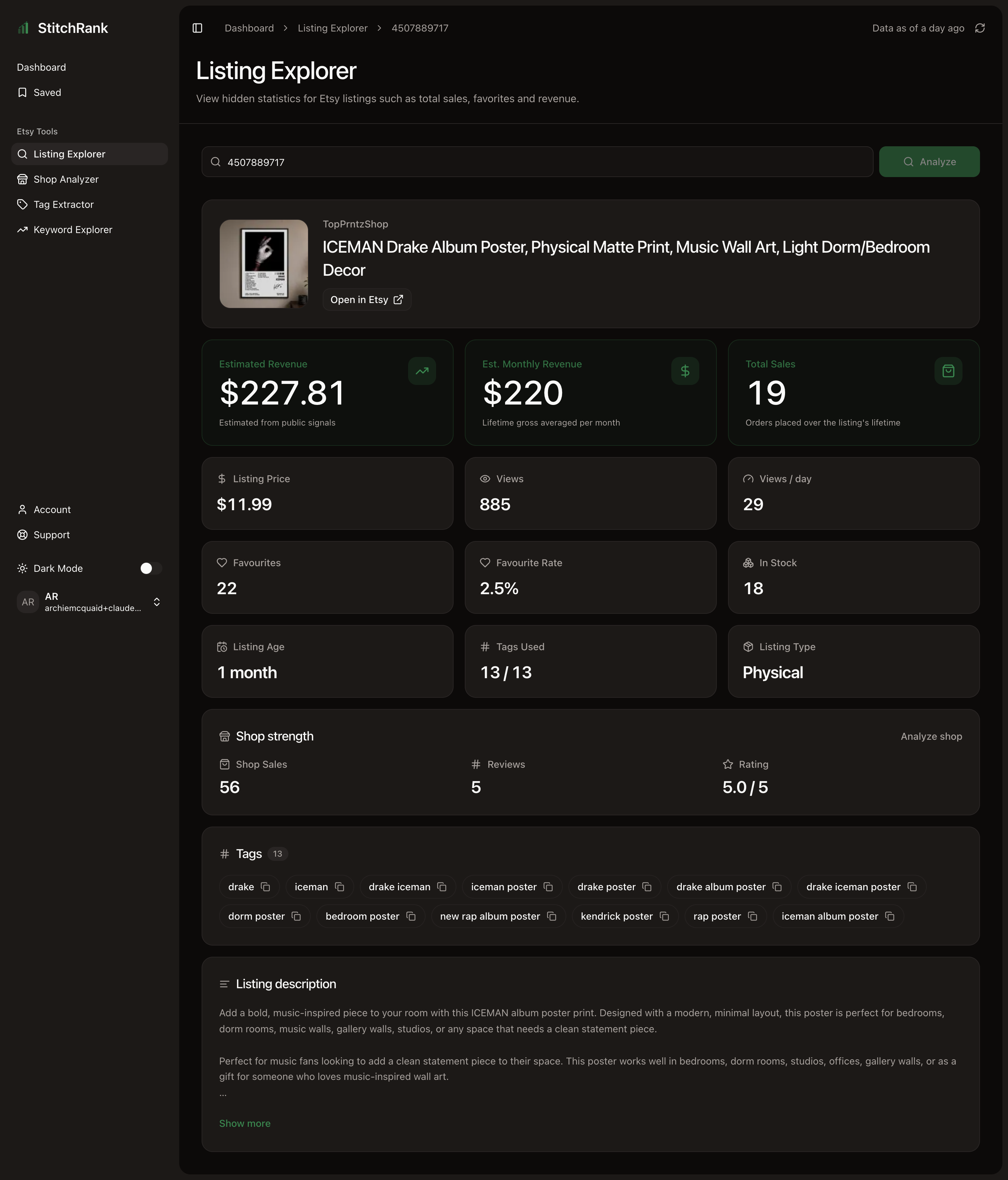
Listing Explorer puts one listing under the microscope. It separates the two things that drive sales, traffic and desirability, so you can tell the difference between a listing nobody sees and a listing people see but do not want. Use it to reverse-engineer a competitor's best seller, or to work out why your own listing is not converting.
When to use it
- You found a competitor's hero listing and want to understand why it sells.
- One of your own listings is stalling and you need to know whether it is a traffic problem or a listing problem.
- You want to track a listing over a few weeks to see if it is gaining or fading.
- You want to copy the exact tag set behind a high performer.
What you get
- Revenue estimated gross revenue, plus an estimated monthly run rate so you see momentum, not just lifetime totals.
- Traffic views and views per day, so you can see how much pull it has right now.
- Desirability favourites and the favourite rate (favourites divided by views).
- Tags the full set of up to 13 tags the listing uses to rank.
- Context the parent shop's sales, reviews, and rating, so you can judge how much of the listing's success rides on shop reputation.
How to read the results
The single most useful read here is traffic versus desirability.
- Views tell you how much traffic the listing gets. Low views means few people are finding it.
- Favourite rate (favourites divided by views) tells you whether the people who do find it actually want it. A healthy favourite rate means the photos, price, and title are landing; a low one means visitors are bouncing.
Cross these two and the diagnosis falls out:
- Low views, healthy favourite rate the product is good, but invisible. This is a visibility and keyword problem.
- High views, low favourite rate plenty of traffic, weak conversion. This is a listing problem: photos, price, or title.
- Low views and low favourite rate rethink the product or the term it targets.
Read estimated monthly revenue rather than lifetime revenue when you want momentum: an old listing can have high lifetime sales while barely selling today. Check tags used / 13 too; a strong listing rarely leaves tag slots empty.
Revenue and sales are estimates from public data, so treat them as directional and use them to compare listings rather than as exact figures. See Methodology.
Turn it into action
- Visibility problem take the term to Keyword Explorer and rework your tags and title around terms you can rank for.
- Listing problem rebuild the photos, revisit the price against the shop's price band, and tighten the title.
- Studying a competitor copy their tags with Tag Extractor, then differentiate where you can do better.
- Tracking revisit every couple of weeks; the numbers refresh over time so you can watch the trend.
For the full diagnosis flow, see Diagnose a stalled listing.
Related
- Next: Keyword Explorer to fix a visibility problem.
- Next: Tag Extractor to copy the tag set.
- Wider view: Shop Analyzer for the whole shop.